 Concrete batching plant software
Nova Software · Concrete batching plant software
Three programs, one data flow for your concrete plant
Control the batching plant, manage many plants on the web, and weigh trucks on a weighbridge connected straight to the plant. Data runs in one stream from the batch to the weighing ticket, with nobody retyping anything in between.
- One ticket code links the whole chainThe delivery ticket prints a QR code. At the weighbridge, scan it, or pick the truck's row by hand if the site has no scanner.
- Keeps running offlineBatching, weighing and saving tickets do not depend on the internet.
- Check it on your phoneOutput of every plant, on a computer or a phone.
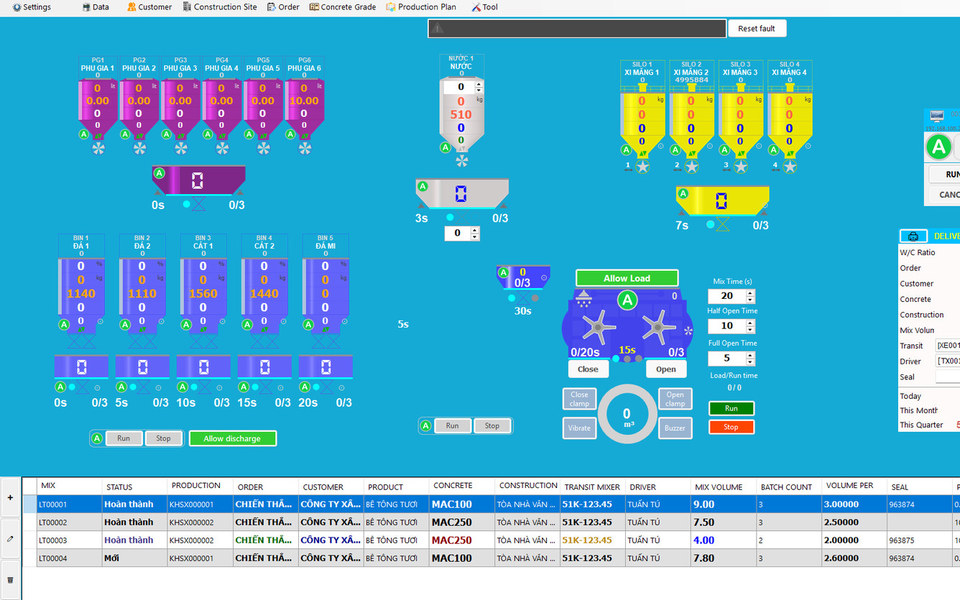
NovaMix
Batching plant control
Weighing, mixing, recipes, material stock, and delivery tickets with a QR code.
See detailsdataMaster data
+ plan
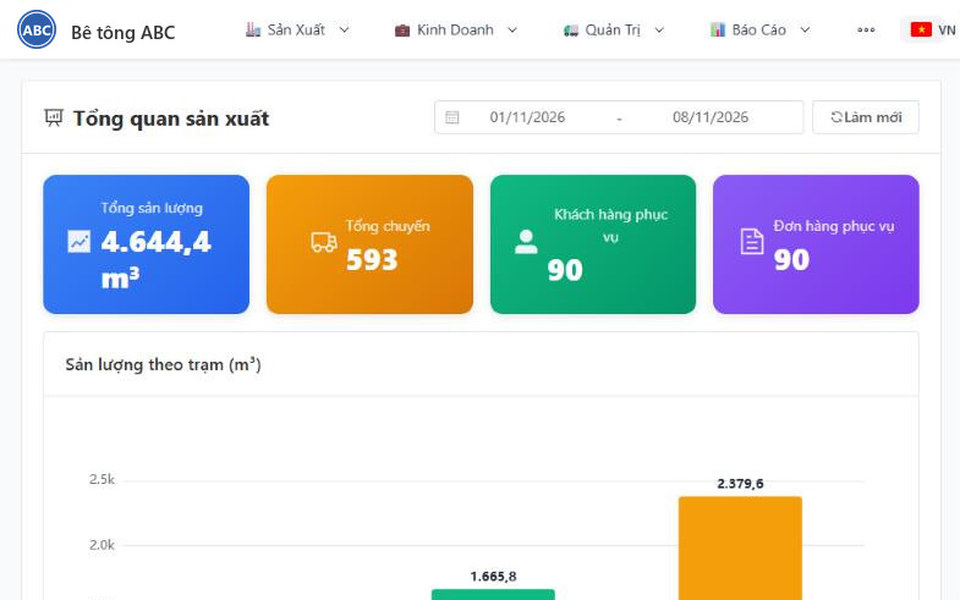
ConMixCloud
Central management of many plants
Output, batch tickets and stock of every plant on the web; batching checked against weighing.
See detailsto be weighedWeighing tickets
+ truck photos
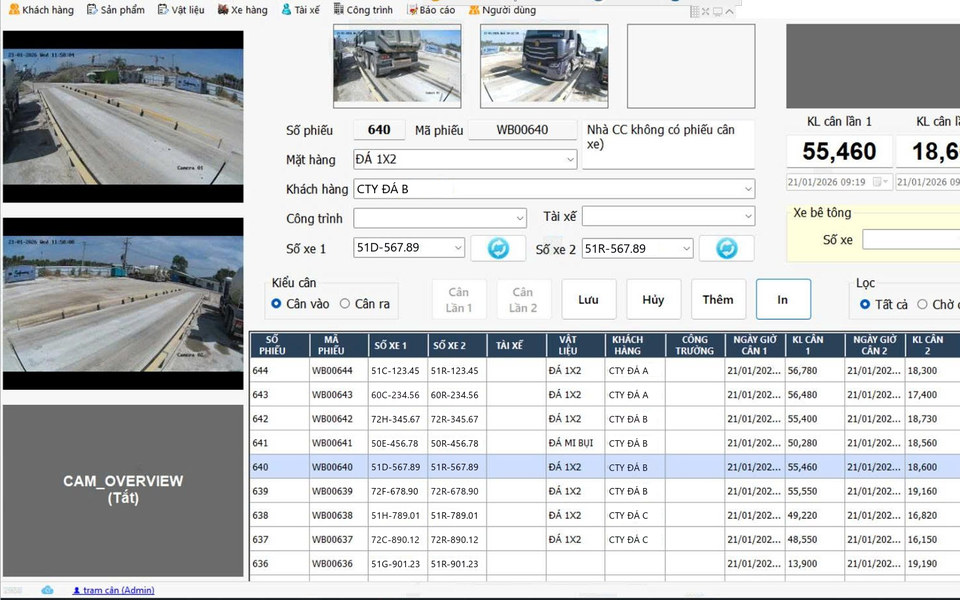
TruckWeightScale
Weigh materials in, concrete out
Scan the QR code or pick the truck by hand, reads 14 scale indicator models, plate recognition by camera.
See detailsCommon problems
Where does plant data usually break?
Between the control room and the weighbridge, many plants still use a sheet of paper in the driver's hand as the data line.
Typing ticket numbers by hand at the scale
One wrong digit or the wrong truck picked, and the weight lands on the wrong ticket without anyone noticing.
The plant says one thing, the scale another
Nobody checks the weighed amount back against the batch just mixed; the gap only shows up when accounting reconciles at month end.
Data arrives late
The owner waits for reports from each plant, each in its own format, hard to compare.
Mix quality depends on the shift operator
Sand and aggregate moisture keeps changing; water and aggregate are corrected by experience rather than calculation.
Incoming materials logged by hand
Cement, sand, stone and admixtures are written into a notebook; stock drifts and nobody knows where the loss is at month end.
No evidence in a dispute
A truck is weighed with no photo and no action history; when a customer or supplier complains, it comes down to memory.
How it works
One ticket code runs from batch to weighing ticket
The ticket code is created in one place and follows the delivery ticket (printed as a QR code), so both ends always mean the same trip.
- NovaMixBatch done, ticket numberedThe software numbers tickets per plant and generates a unique identifier the moment the ticket is saved.
- Delivery ticketQR code printed on the ticketThe code is printed as a QR on the ticket the driver carries. The code is short, so it scans even on a creased ticket or smudged ink.
- NovaMix ⇄ ConMixCloudTwo-way sync with the cloudMaster data (customers, construction sites, trucks, drivers, materials, recipes, orders, plans) syncs from the cloud down to the plant; production data (batch tickets) goes from the plant up to the cloud, in background cycles. If the network fails the data is kept and sent in the next cycle. A plant that does not use the cloud enters master data by hand in NovaMix.
- ConMixCloud → TruckWeightScaleThe weighbridge downloads the waiting listThe list of trucks just batched and not yet weighed, with concrete grade, ordered m³, the weight the plant reported, driver, customer and construction site.
- WeighbridgeScan the QR or pick the truck, then weighThe operator scans the QR on the ticket; where there is no scanner they pick the truck's row in the waiting list by hand. Either way the right ticket is selected, with no ticket number typed.
- ConMixCloudChecked on one lineThe weighed amount flows back to the right batch ticket on its own. One row per truck: what the plant reported and what the scale read, side by side.
One place creates the ticket code
The weighbridge never builds codes itself, it only compares strings, so both ends never read the same ticket differently.
Offline, no ticket lost
The database at the plant is the queue. Weighing and batching do not depend on the internet; the cloud is only where data is gathered.
Automatic check, not a report
Two numbers from two systems land side by side on their own, with nobody retyping anything in between.
Materials in
Incoming materials: from the weighbridge to stock
It is not only concrete going out. Cement, sand, stone and admixtures arriving at the plant are also weighed, allocated and counted into stock in the same system.
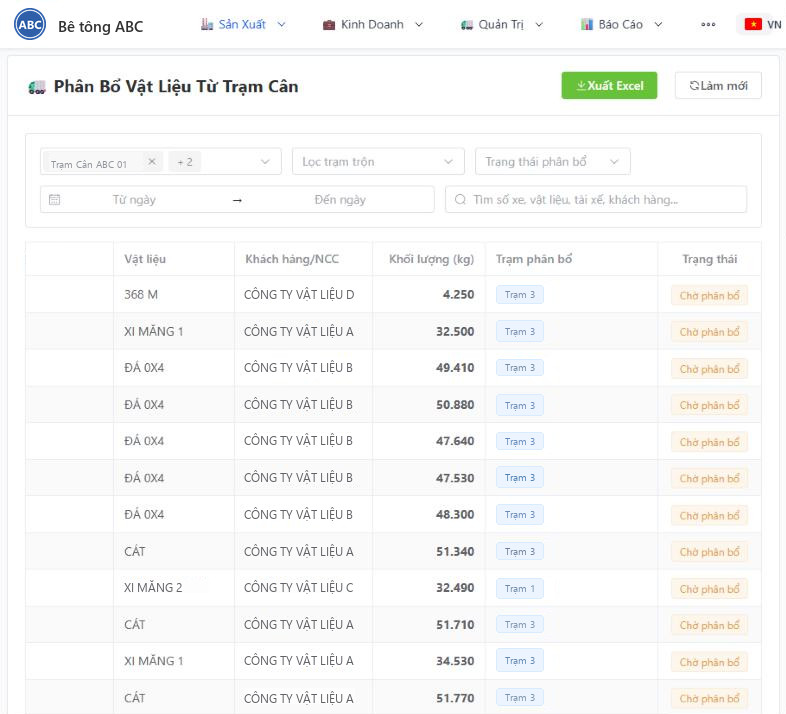
Incoming materials need no handwritten log either
Trucks carrying cement, sand, stone and admixtures cross the weighbridge and the weight appears on ConMixCloud by itself. You allocate it to the receiving plant; stock is calculated from what came in and what each batch actually consumed.
- Every incoming material weighing ticket appears on the web, filtered by weighbridge, allocation status and date
- Allocation checks the total weight; if you split it wrongly, reset and split again, and the earlier split can still be looked up
- Materials that do not cross the weighbridge can still be received by hand
- Close stock by period, compare counted stock with calculated stock, and review past closings
- Reports export to Excel; every allocation and stock closing is written to the system log
- WeighbridgeWeigh the truck carrying materialsCement, sand, stone and admixtures are weighed in; the net weight is the difference between the two weighings, with truck and plate photos.
- ConMixCloudThe weight goes to the cloudThe incoming material ticket shows up on the web as “Waiting for allocation”, kept apart from concrete weighings.
- AllocationSplit among the receiving plantsSplit one ticket across one or more plants. The split must add up exactly to the weighed amount.
- StockAdded to stock automaticallyOnce allocated, the receipt is created. Stock = opening + received − issued, where issued is the actual consumption of each batch.
- Stock closingCount, compare the differenceEnter the counted stock; the system compares it with calculated stock and records the difference; the next period starts from the counted figure.
The product suite
Three programs, one job each
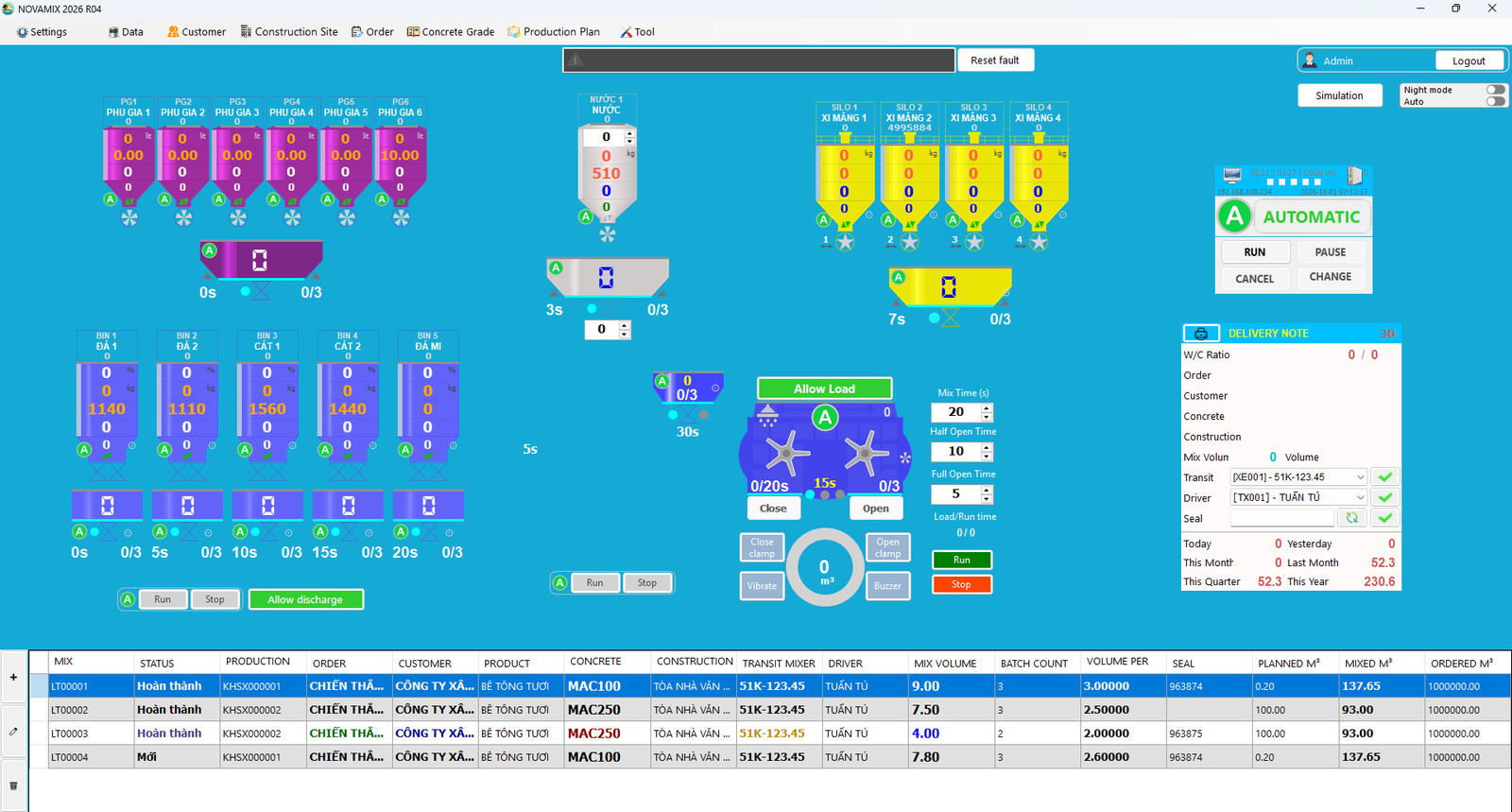
NovaMix: batching plant control
Automates feeding, weighing and mixing, and manages orders, recipes, stock and reports in a single program.
- Moisture compensation for sand and aggregate with automatic water correction on every batch
- Coarse and fine weighing with separate tolerances per scale
- Prepare mixing orders even before the PLC is connected
- 70+ alarm types and a log of every action
- Print delivery tickets with a QR code
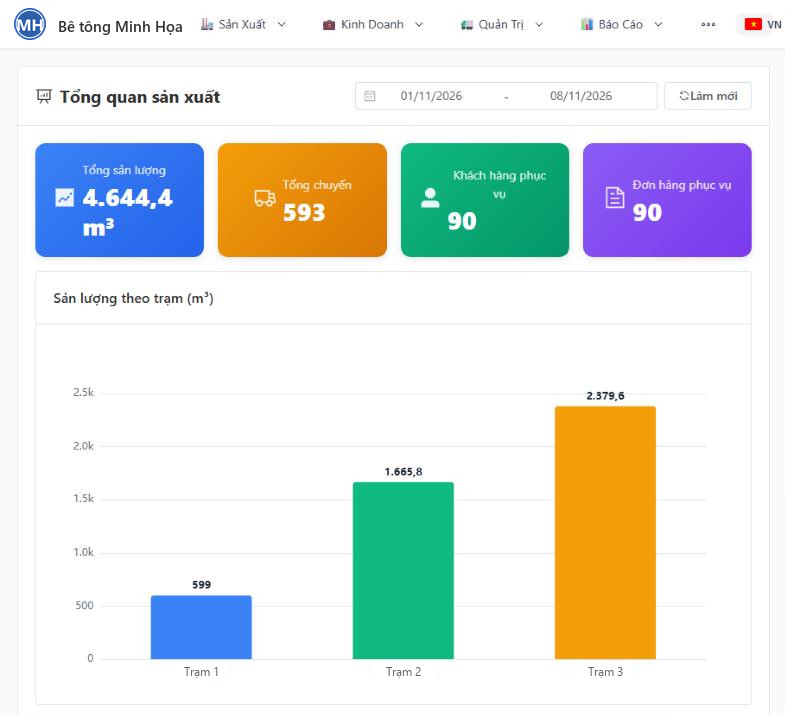
ConMixCloud: central management on the web
Owners see all production on one screen, from a computer or a phone.
- Plant and weighbridge weights checked on the same line
- Output of every plant in real time
- Incoming material weights reach the cloud on their own, are allocated to plants and counted into stock
- Multi-step production plans, permissions down to each plant
- Returned concrete: reason, treatment, traced back to materials
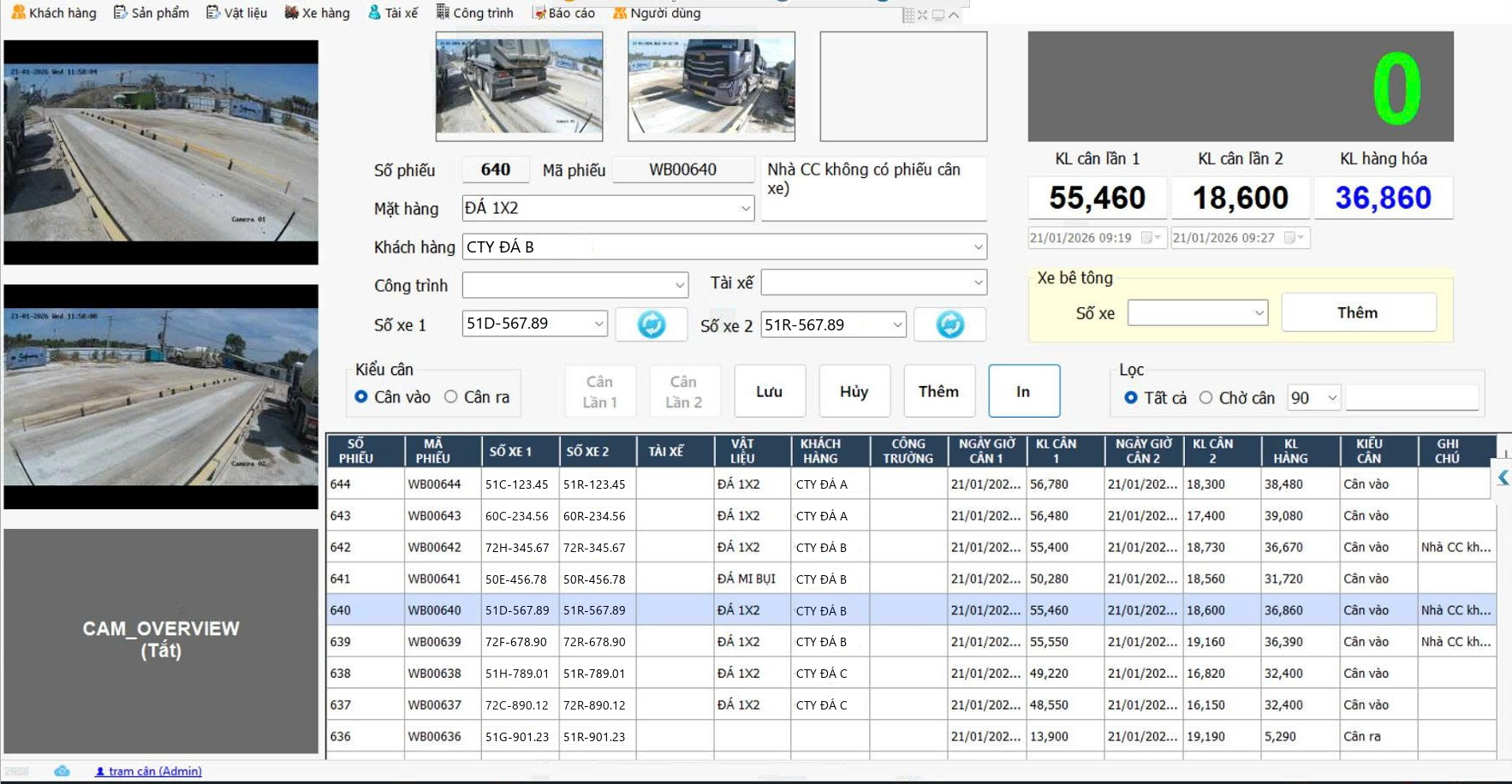
TruckWeightScale: a weighbridge connected straight to the plant
Weighs materials in and concrete out, connected straight to the batching plant to remove manual typing.
- Scan the QR on the ticket, or pick the truck's row in the waiting list by hand
- Reads 14 common scale indicator models
- Camera plate recognition and truck photos
- Weighs incoming materials too: the weight goes to the cloud for allocation and stock
- Keeps running offline and resends when the network returns
- One weighbridge can serve several plants
In a few numbers
Requirements
Will it work with your setup?
Send us your plant details and we will tell you right away what works.
What you need
- A Windows 10 or 11 PC at the plant
- Siemens S7-1200 PLC, conveyor-belt or skip-hoist plant
- Standard SQL Server database; the data belongs to the business
- Internet is only needed for the cloud part; the plant keeps running offline
- Weighbridge: a common scale indicator, plus a camera if you want plate recognition
Common scale indicators read out of the box
TruckWeightScale reads common scale indicators out of the box, with no custom driver for each brand.
Brand names are only used to describe compatibility.
Process
From survey to operation
- Step 1Survey by photosYou send photos of the plant, control cabinet, PLC and scale indicator by WhatsApp, Zalo, Telegram or email; our engineers review them and tell you what will work. Free, no obligation.
- Step 220-minute demoA full run on a simulator that mirrors your plant, without touching the real plant.
- Step 3RolloutNew install, or upgrade of an old plant to NovaMix with no mechanical changes.
- Step 4Training and supportOperator training, technical support and remote version updates.
Frequently asked questions
What if the internet goes down?
Batching, weighing and saving data do not depend on the internet. Tickets wait on the plant's PC and are sent to the cloud once the network is back. When the weighing operator presses Save, the software only writes to the local machine and hands control straight back, so trucks never queue waiting for the network.
Which PLC does my plant use?
NovaMix works with Siemens S7-1200 PLCs, for conveyor-belt plants and skip-hoist plants. If you are not sure your plant fits, send photos of the control cabinet and PLC for our engineers to review.
Can an old plant be upgraded?
Yes. Nova upgrades old plants to NovaMix without changing the mechanics.
Can one weighbridge serve several plants?
Yes. TruckWeightScale downloads the waiting lists of several plants to the same weighbridge.
How are incoming materials (cement, sand, stone) tracked?
The truck carrying materials is weighed in TruckWeightScale and the weight reaches ConMixCloud as waiting for allocation. You allocate it to the receiving plant, the receipt is created and stock is calculated: opening stock plus receipts minus issues, where issues are the actual consumption of each batch. At period end you close the stock to compare with the physical count.
Who owns the data? Can it connect to accounting or ERP?
Data sits in a standard SQL database and belongs to the business. On the cloud, each company has its own database. There is an API to connect to existing software; integrations with ERP and accounting systems such as Odoo, Bravo, MISA and FAST are done on request.
Which languages are supported?
NovaMix has 7 interface languages: Vietnamese, English, Chinese, Thai, Khmer, Lao and Indonesian, switchable inside the software. ConMixCloud is available in Vietnamese and English.
How much does it cost?
Price depends on the number of plants, weighbridges and the existing PLC configuration. Send your plant details and we will quote an exact price rather than a guess.
How can I try it before buying?
Book a free, no-obligation 20-minute online demo on the simulator. To find out whether your plant is compatible, send a few photos by WhatsApp, Zalo, Telegram or email; our engineers can usually tell without visiting.
Book a demo or send photos of your plant for our engineers to review
Tell us how many batching plants and weighbridges you have and which PLC they use, with a few photos of the plant if you can. We reply within one working day.
+84 903 071 100
134/49B Duong Thi Muoi, Tan Thoi Hiep Ward, Ho Chi Minh City, Vietnam
0319406766