 Concrete batching plant software
NovaMix · Concrete batching plant control
NovaMix: concrete batching plant control software
Automates feeding, weighing and mixing, and manages orders, recipes, stock and reports in a single program that runs on a Windows PC.
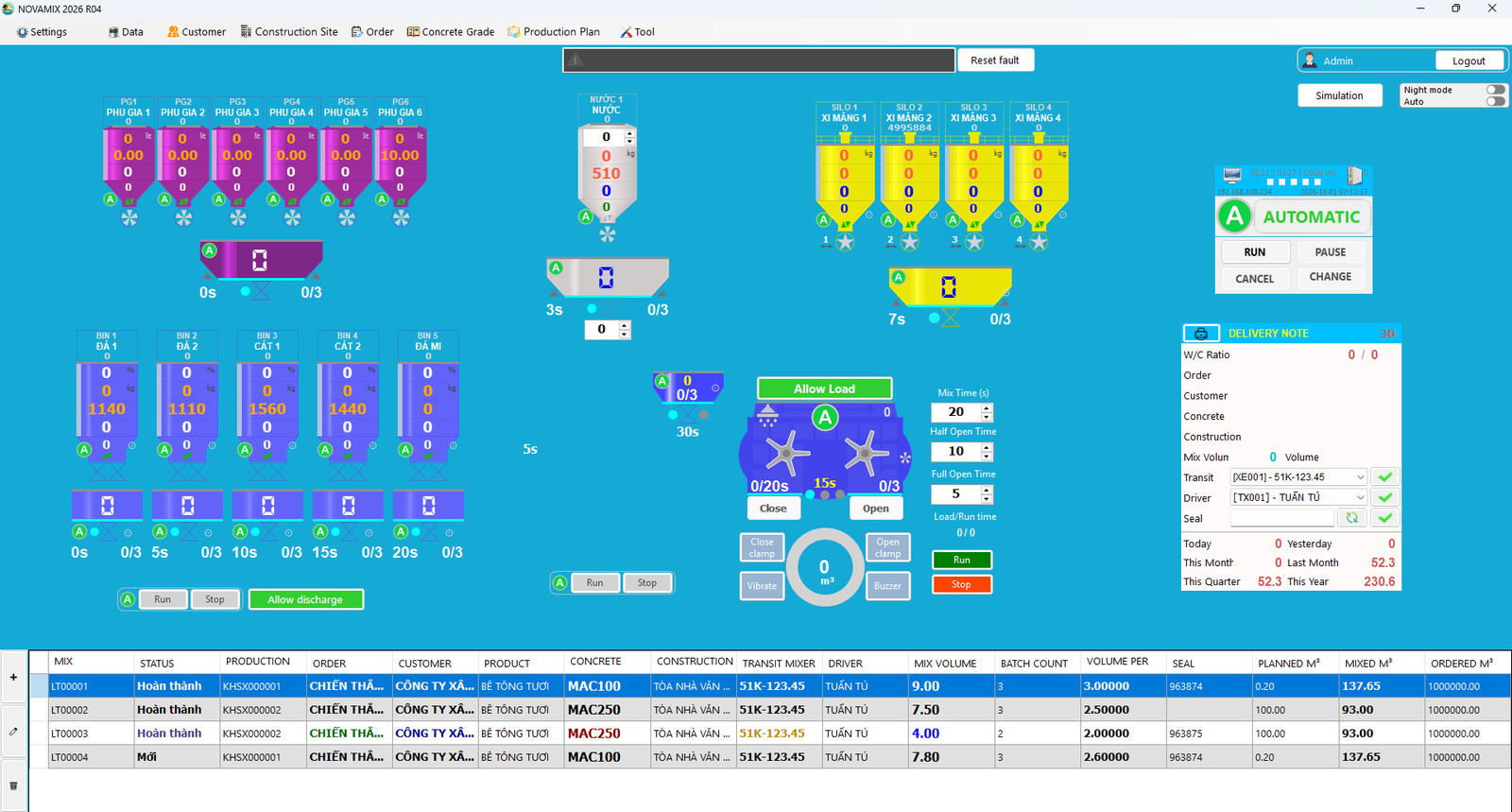
Operation
Real-time control and monitoring
Full plant simulation
Silos, aggregate bins, scales, holding hoppers, conveyors, skip hoist and mixer on one screen. Gate states, the material being discharged and each scale's weight update continuously.
Animated mixer
See at a glance whether the mixer is mixing or discharging concrete.
Three operating levels
Fully automatic; semi-automatic, switching individual scale groups, discharge gates or the skip hoist to manual when needed; and fully manual. Every mode change is written to the log.
Confirm before running
Shows the plan, order, customer, concrete grade and construction site so the operator can check one last time and avoid wrong batches.
Handle faults while running
Pause, resume or cancel a ticket; change the batch number; skip the weighing or discharge of one silo (with a confirmation dialog); manually top up missing weight. Every action is recorded.
Dry run
Test the machinery and check signals without spending materials.
Day/night interface by time
Switches between day and night on its own; background colors and start times are adjustable, easier on the eyes for night shifts.
Alarms on screen
Scale, gate and device faults appear as an alarm line at the top of the control screen with the time they occurred and a Reset button; operation messages show in green, orange or red.
Accuracy
Accurate weighing
What sets NovaMix apart: the right mix on every batch, without depending on the shift operator's experience.
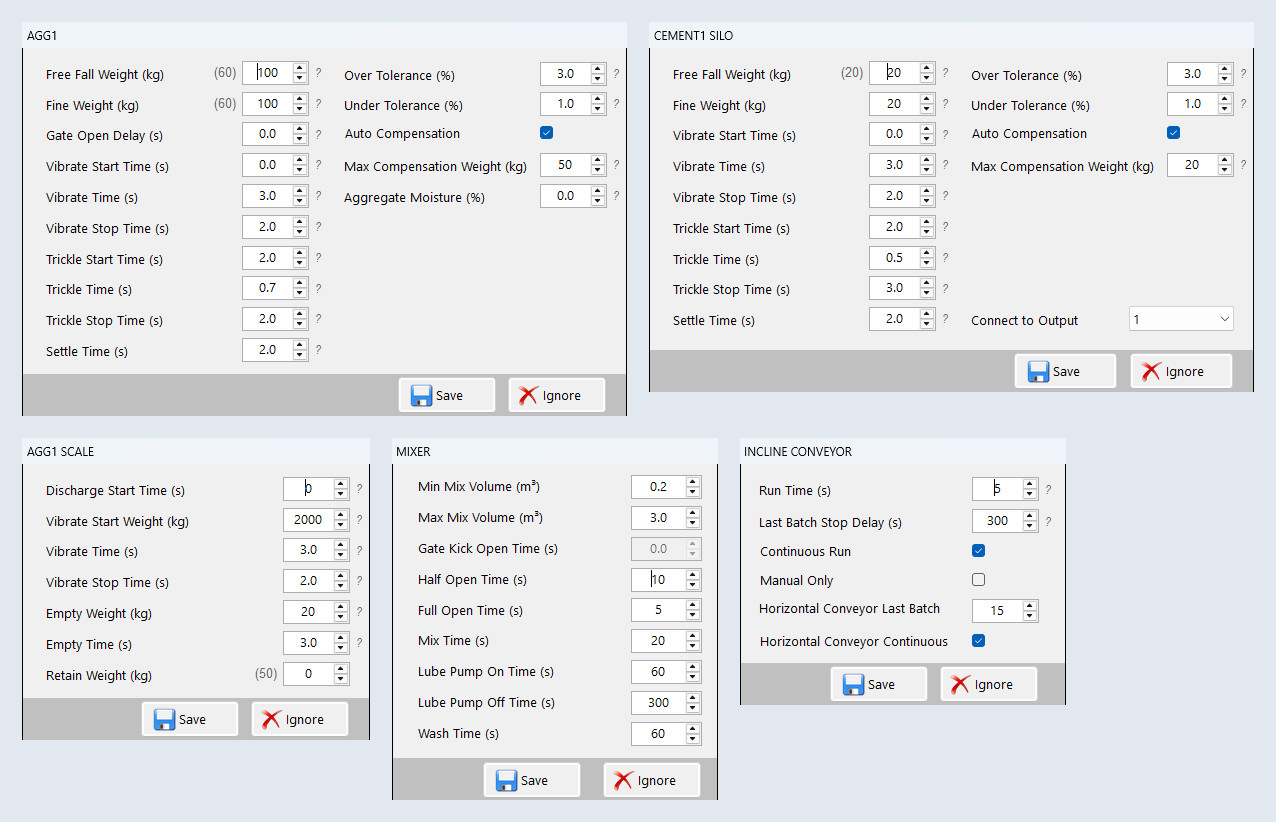
Moisture compensation for sand and stone, with automatic water correction
Enter the moisture (%) of each sand and stone bin. NovaMix increases the aggregate weight accordingly and reduces the water by exactly the water already in the aggregate, so the concrete grade stays on design even as moisture changes through the day.
- Smart per-batch error compensation, with a maximum compensation limit set by the engineer for each scale
- Add or remove water quickly while mixing
- Several silos holding the same material: weight is split automatically and always adds up to the recipe
Two-stage coarse and fine weighing
Set free-fall weight, fine weight, fine-gate delay, vibrate/trickle and settle times directly from the computer.
Tolerance per scale
Set over and under tolerance separately for each scale; exceeding it raises an alarm.
Mixer operating times
Mixing time, half and full gate opening, lube pump, washing; minimum and maximum mixer volume. Separate settings for the holding hopper and skip hoist.
Batches split by mixer capacity
Enter the truck's total m³ and the software calculates the number of batches and m³ per batch.
Step-by-step scale calibration
Right in the software: save the zero point, place a reference load, save the load point; the result is shown in green, yellow or red. Zero the scale from the computer.
Flexible plant configuration
Up to 5 aggregate bins, several cement and fly ash silos, up to 6 admixtures, water and ice water; conveyor-belt or skip-hoist plants.
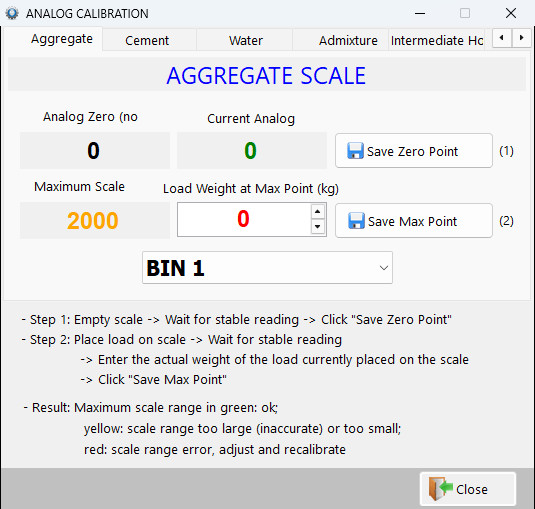
Step-by-step scale calibration, right in the software
The instructions are on screen, with one tab per scale (aggregate, cement, water, admixture, intermediate hopper).
- Step 1: empty the scale, wait for a stable reading, save the zero point
- Step 2: place a reference load, enter its actual weight, save the load point
- The result shows green, yellow or red so you know whether the range is acceptable
Scheduling
Recipes, mixing orders and production plans
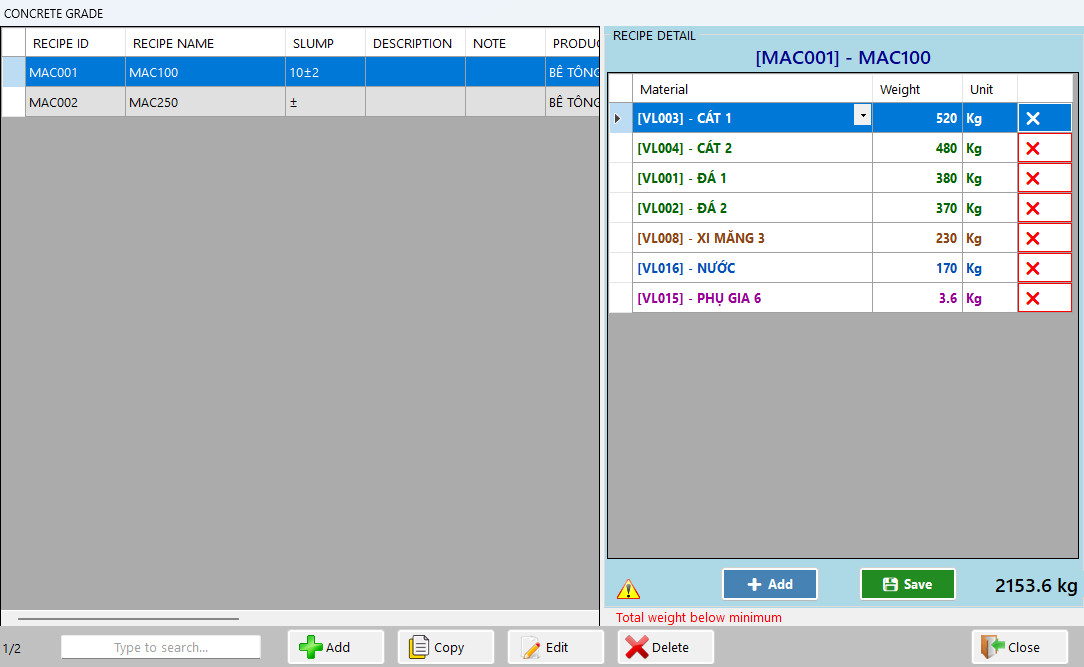
One recipe per grade, clear at a glance
Grades on the left, each material's recipe on the right with the total weight. Add, copy, edit and delete recipes right on screen, with a quick search box.
- Each grade carries slump, description, note and product
- Recipe per material: add or remove rows, edit weights, then press Save
- Warns when a recipe's total weight is below or above the set threshold
Hundreds of recipes
Create, edit and search quickly; material quantities per m³. Warns when a recipe's total weight is below or above the set threshold, both when editing the recipe and when creating a mixing order.
Mixing orders
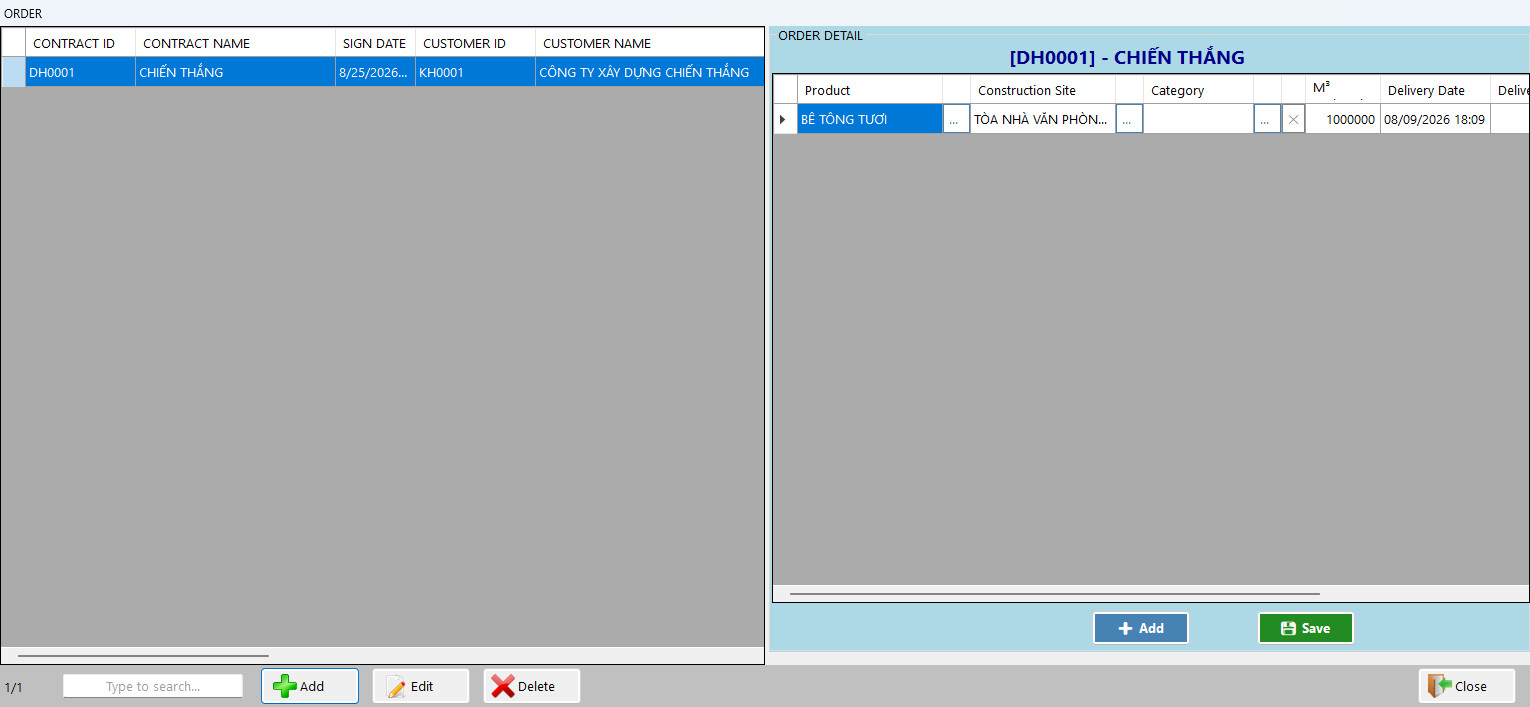
Pick customer, construction site, order, grade, truck, driver and volume; track progress against the ordered m³. The order ends by itself once all batches are done.
Prepare orders before the PLC is connected
Dispatchers prepare orders ahead; at run time they just press go. The number of batches and m³ per batch are still calculated automatically.
Production plan
Plan by date, time and order, track produced output against plan (shortfall or excess in m³ is flagged); completed plans are locked.
Create a mixing order: pick the plan, the truck, and see the recipe right away
Pick a production plan, a transit mixer and a driver; the recipe details appear beside it with the total weight and a warning when it is below the allowed level. Enter the number of batches, m³ per batch, mixing volume and seal number, then press Agree.
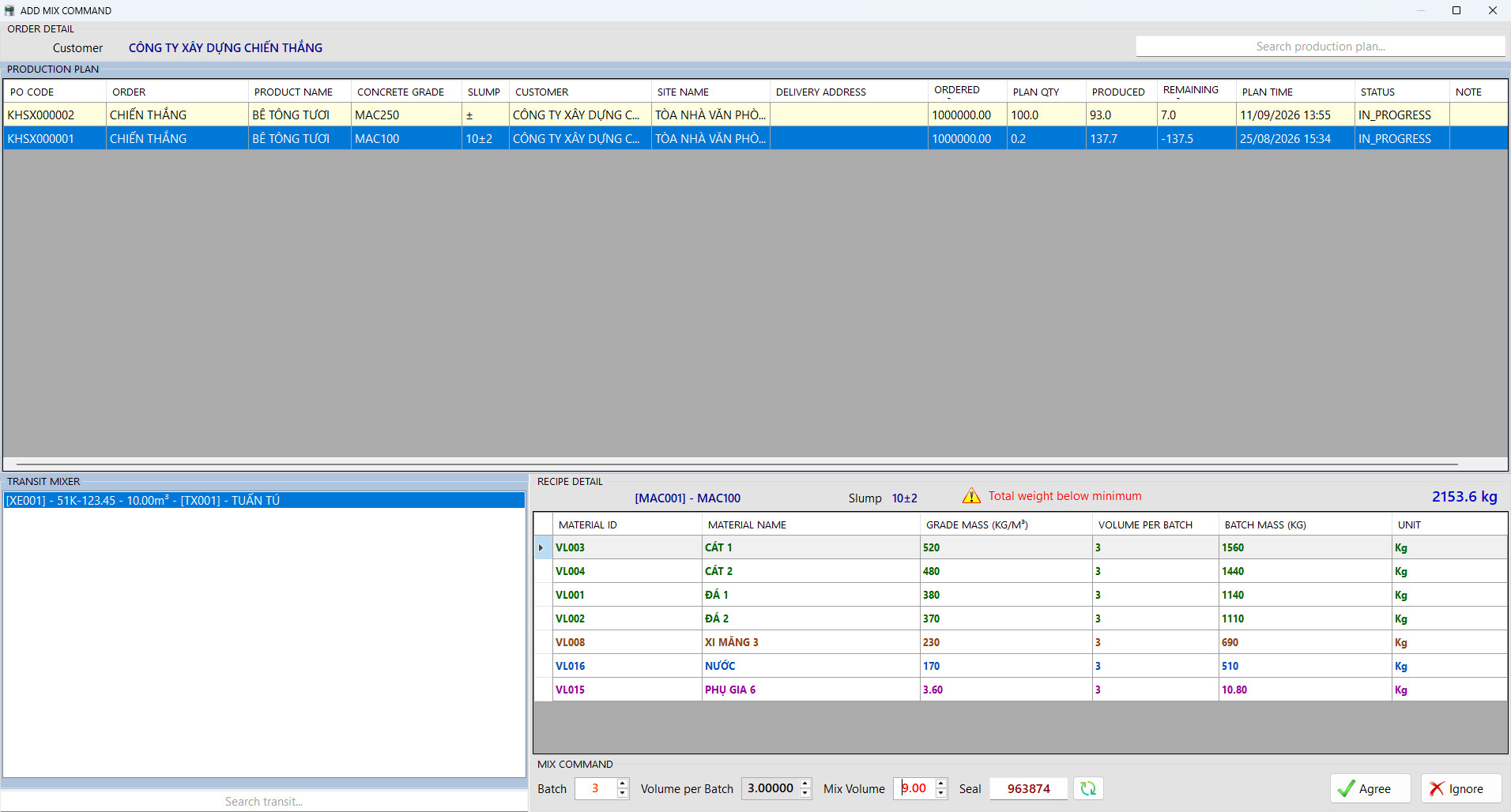
The production plan on one table
Each plan shows its code, time, order, customer, construction site, concrete grade, planned and produced quantity, and status. A Complete button locks the plan.

Management
Business data and material stock
Business data
All master data lives in one program and is picked from lists when creating orders, with no repeated typing. Plants using the cloud get this data synced down from the cloud; plants without the cloud enter it by hand in NovaMix.
- Customers, construction sites (with work items), orders/contracts with ordered m³ and mixed m³
- Concrete grades, products, transit mixers, drivers, sales staff, materials, suppliers
- Automatic codes: customer, site and order codes are generated by rules the plant sets
Material stock
Stock is calculated from the actual consumption of each batch, not from estimates.
- Receipts: material, weight, supplier, time, note
- Stock = opening + received − issued; close stock by period, receipts before the closing date are locked against edits
- Low-stock alarm per material: the matching silo or bin blinks on the control screen
Operational safety
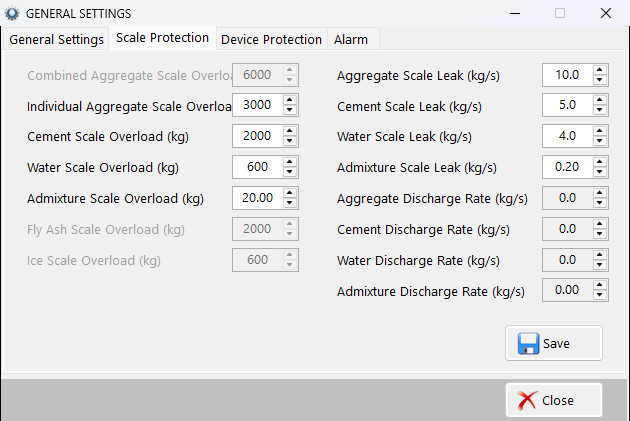
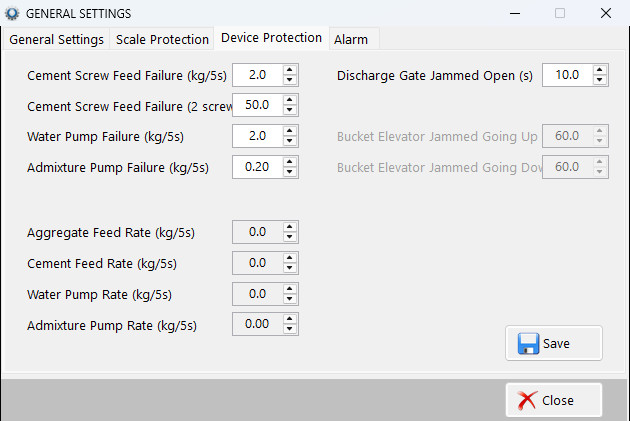
Alarms and equipment protection
| Alarm group | Examples |
|---|---|
| Weighing | Over/under weighing; scale overload; scale leak; slow weighing, slow discharge; scale zero drift. |
| Gates and mechanisms | Scale, hopper or mixer gates not opening or closing fully; concrete discharge gate jammed; skip hoist jammed. |
| Feeding | Screw conveyor not feeding the scale; water or admixture pump not feeding the scale; aggregate bin leak. |
| Power and signals | Motor overload; conveyor belt not running; scale signal fault; PLC connection lost. |
Documents
Delivery tickets and reports
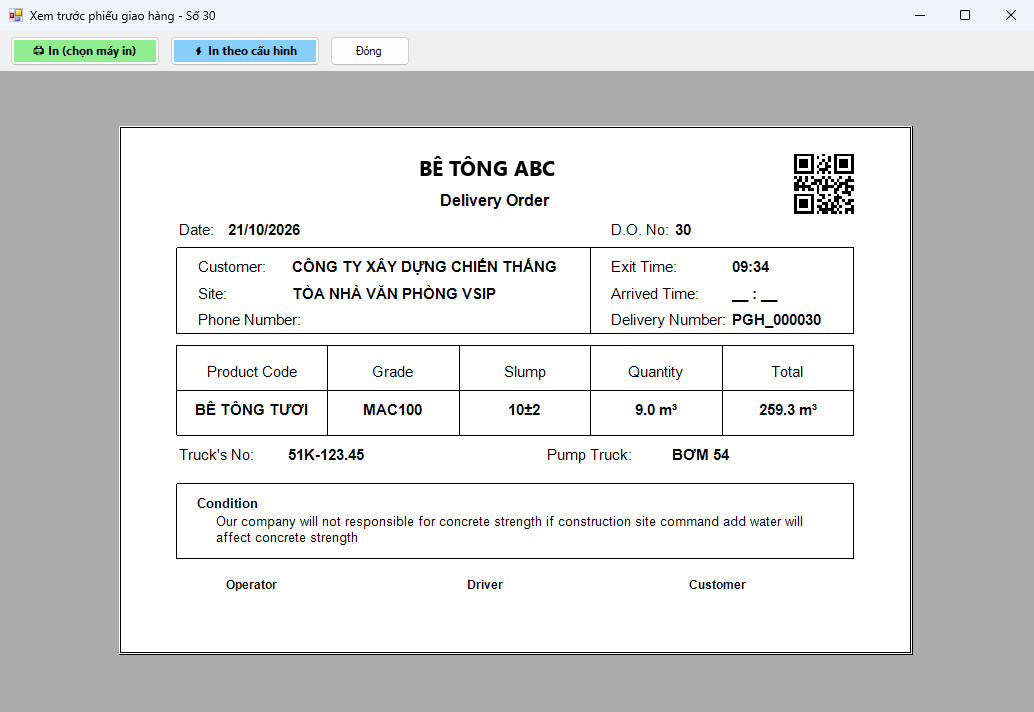
Delivery tickets printed instantly, with a QR code
The ticket shows customer, construction site, grade, slump, quantity, transit mixer and pump truck. The QR code at the corner lets the weighbridge scan to pick the right truck; a weighbridge without a scanner picks it by hand from the waiting list.
- Print to a chosen printer, or print using the saved setup
- Preview before printing
- Ticket template with adjustable layout, company logo and QR position
Delivery tickets with a QR code
Printed as soon as the batch is done. The ticket template lets you adjust the layout, company logo and QR position.
Four report groups
Delivery tickets, output, materials consumed, production log, plus a detailed printout of each batch.
Excel export
Carry on working with accounting and purchasing.
Traceability
Batch log: what was set, what was actually weighed
Every delivery ticket keeps each batch and each material's weight, for reconciliation when a customer or supplier asks.
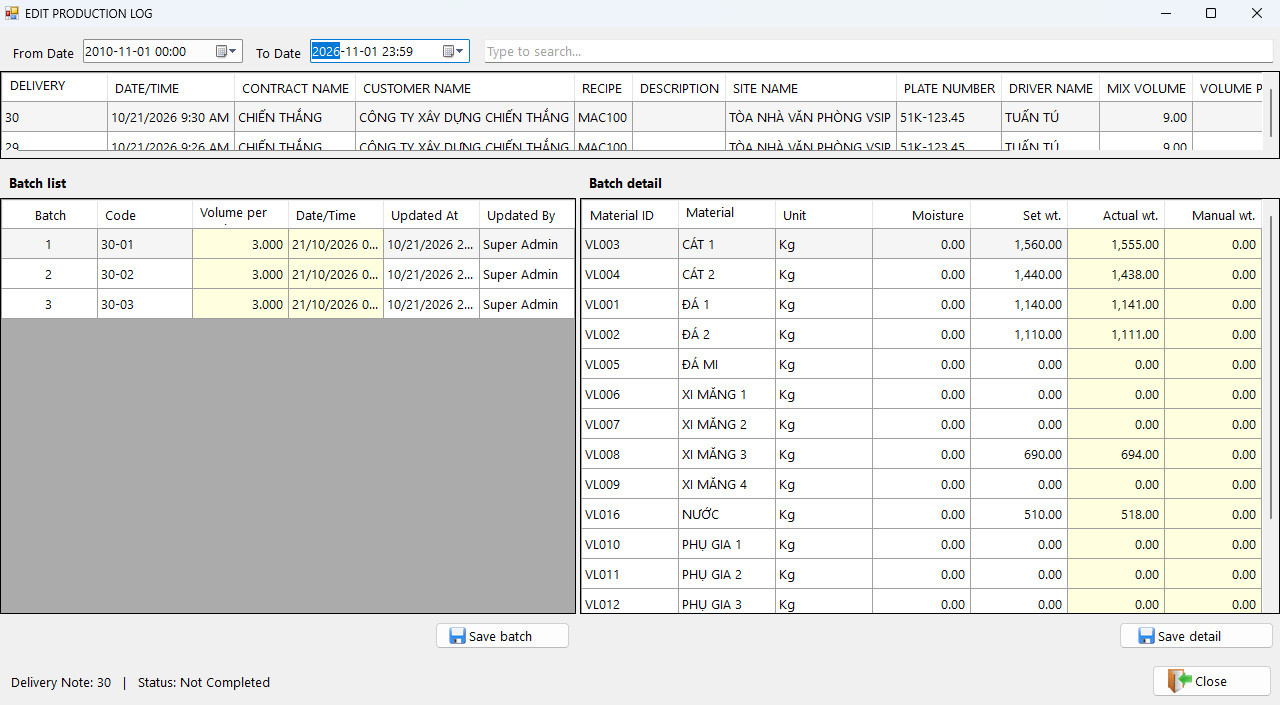
- Each batch lists set weight, actual weight, manual top-up and moisture of every material
- Filter by date range, with a quick search box; pick a batch to see its details at once
- A completed ticket is locked and cannot be edited
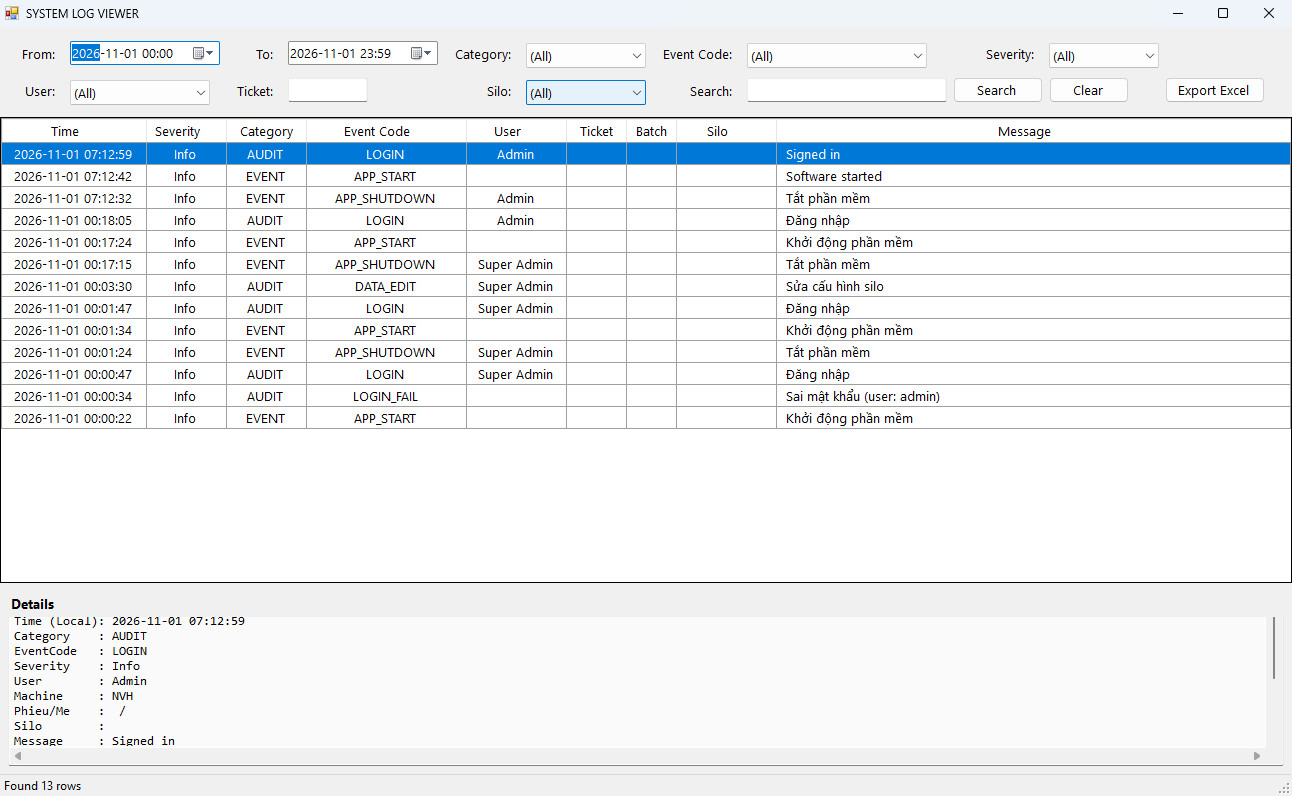
A system log that records every event
Logins, program start and any data edit are recorded with the user, the machine and the content. Filter by date, category, severity, user, ticket and silo.
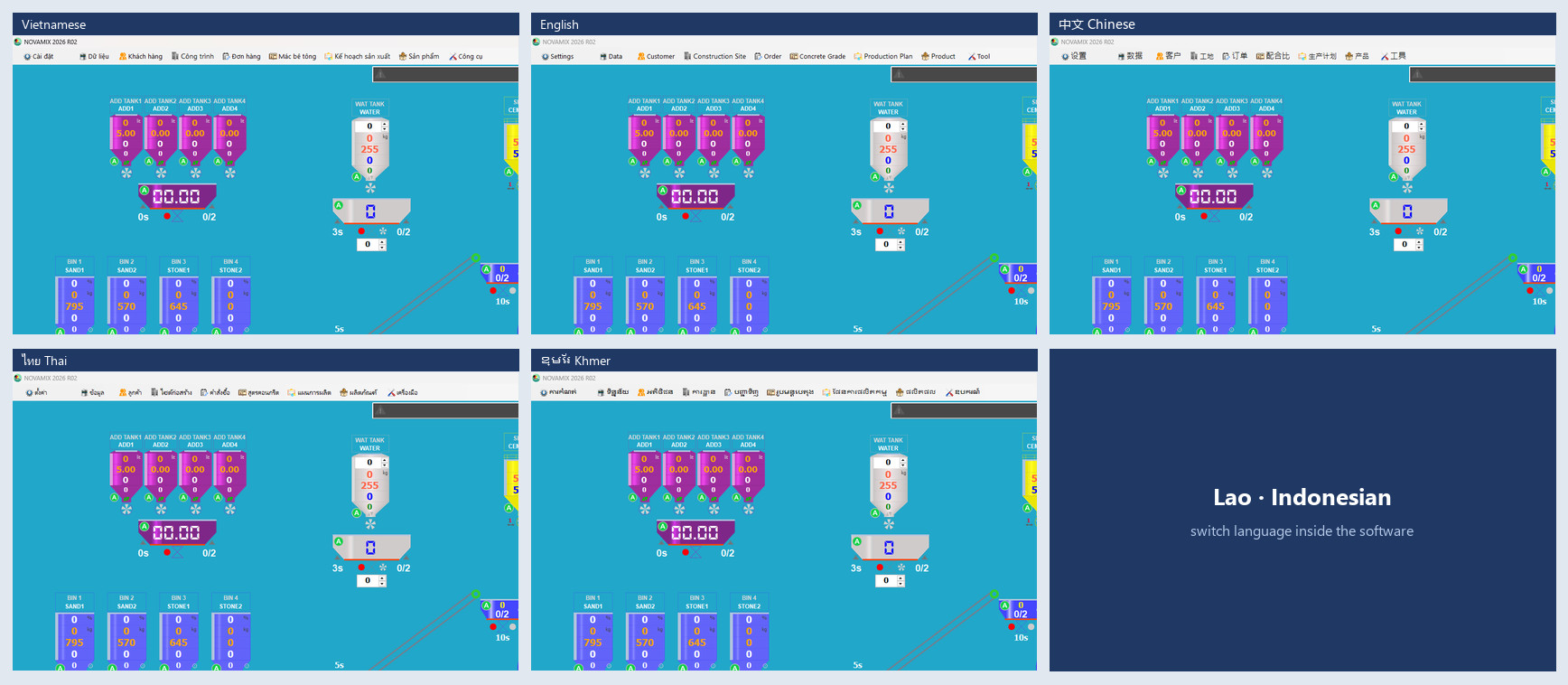
Multilingual
Interface in 7 languages
Vietnamese, English, Chinese, Thai, Khmer, Lao and Indonesian, switchable inside the software with no reinstall, so plants abroad can operate in their own language.
Trust
Security, traceability and data safety
Three permission levels
Administrator, Engineer, Operator. One account per person; you must sign in before you can operate.
A system log of every event
Logins (including wrong passwords), password changes, edits to recipes, orders and plans, ticket weight edits, manual top-ups, mode changes, ticket pause/cancel. Filter by date, user, ticket and silo; export to CSV.
Every batch saved continuously
Each batch is written to the database while it mixes, including any manual top-up (stored separately for reconciliation). If one write fails it is retried next time, so no batch is lost.
Automatic backup
Optional database backup and compression; back up and restore the whole PLC configuration in a few steps.
The data belongs to the business
Standard SQL Server database, easy to query and connect to other systems.
Technical
System requirements
| Item | Details |
|---|---|
| Workstation | Windows 10 or Windows 11 |
| Control | Siemens S7-1200 PLC on Ethernet; conveyor-belt and skip-hoist plants |
| Database | Microsoft SQL Server (the free Express edition is enough for one plant) |
| Cloud connection | Optional. With the cloud: master data syncs from the cloud down to the plant and production data goes back up. Without the cloud: master data is entered by hand. If the network drops, the plant keeps running normally |
| Interface languages | Vietnamese, English, Chinese, Thai, Khmer, Lao, Indonesian, switchable inside the software |
| Updates and licensing | Remote updates for many workstations; per-device license activation |
| Integration | API available; ERP and accounting integration (Odoo, Bravo, MISA, FAST) on request |
Want to see NovaMix run on a plant like yours?
Book a free, no-obligation 20-minute online demo on the simulator. Send photos of your plant so our engineers can review them first.
+84 903 071 100
134/49B Duong Thi Muoi, Tan Thoi Hiep Ward, Ho Chi Minh City, Vietnam
0319406766