 Concrete batching plant software
ConMixCloud · Central management of many plants
ConMixCloud: manage many concrete plants on the web
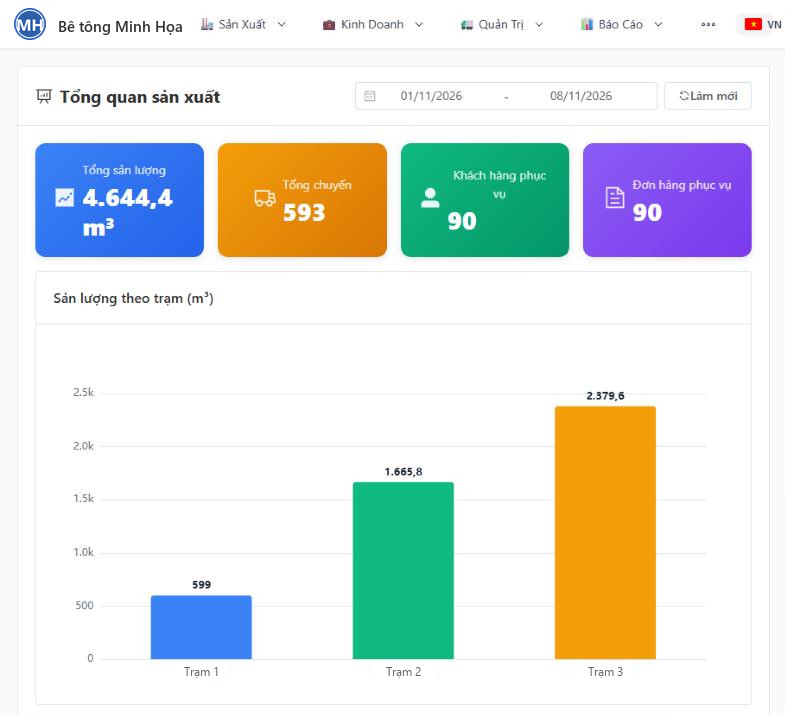
Owners see all production on one screen, from a computer or a phone: output, batch tickets, stock, and the plant's weights checked against the weighbridge.
Features
What you see
Production
Live production activity · Production log · Production plan · Concrete grades · Materials · Stock management (receipts, stock) · Suppliers.
Sales
Orders · Customers · Construction sites · Work items.
Administration
Transit mixers · Drivers · Sales staff.
Weighbridge
Weighbridge monitor (weighing tickets pushed live to the web) · Material allocation · Returned concrete.
Reports
Daily output · Material summary · Batch ticket summary · Material detail · Batch ticket detail. Excel export.
System
Users · Roles · Permissions · System log · Company and plant management.
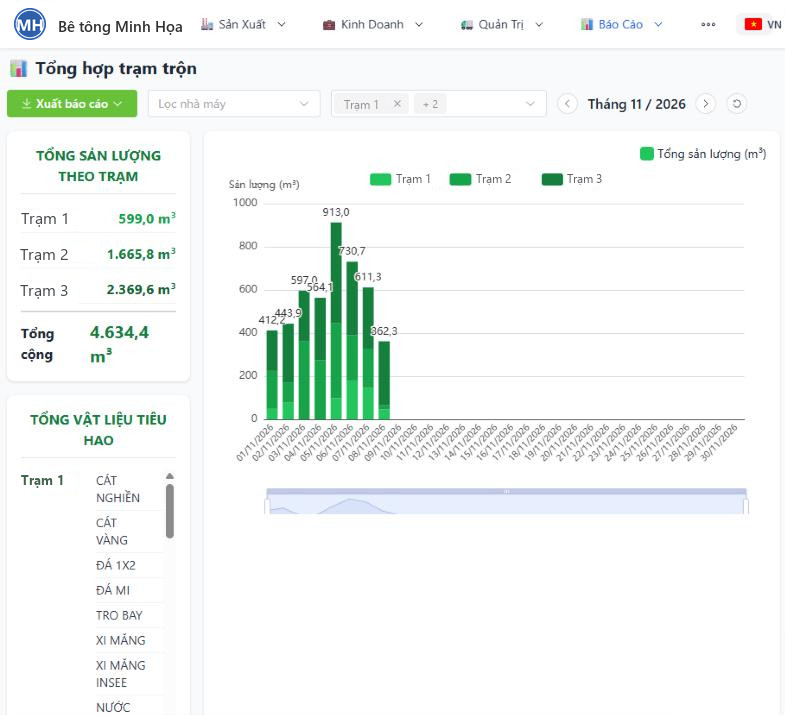
Output by day, by plant
A stacked column chart for each day of the month, split by plant, with total output and total materials consumed by each plant.
- Pick the month and filter by plant in one click
- Each plant's total output and material consumption right beside the chart
- Export the report when accounting or purchasing needs it
What sets it apart
Batching checked against weighing
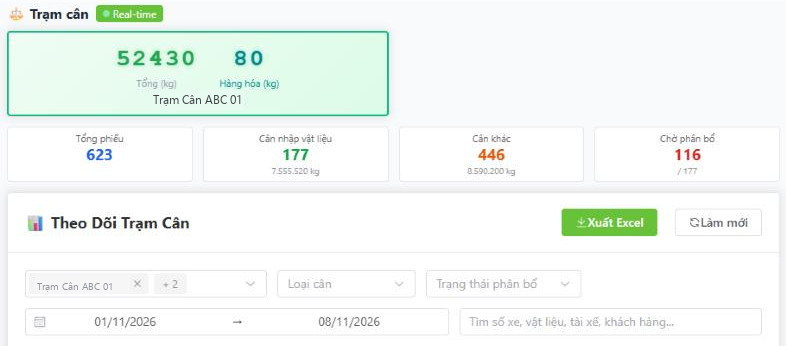
The weight appears live on the web
The weight card shows the weighbridge's total and goods weight in real time. Below it are the total number of tickets, incoming material weighings, other weighings and the tickets still waiting for allocation.
- Filter by weighbridge, weighing type, allocation status and date range
- Search by truck number, material, driver, customer
- Export to Excel when accounting or purchasing needs it
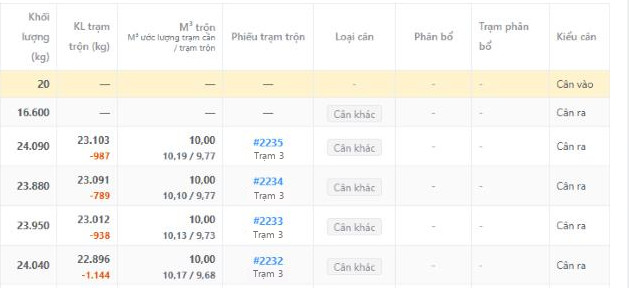
What the plant reported, what the scale read, on the same line
The two numbers come from two different systems and land side by side on their own, with nobody retyping anything in between. An abnormal difference shows up within the day, not in the month-end report.
- One row per truck: weighed amount, plant-reported weight, difference, m³ and batch ticket
- Weighing tickets are pushed to the web as soon as the weighing is done
- Incoming materials crossing the weighbridge go straight into stock; issues follow the actual weight of each batch
Materials in
Incoming materials: from the weighbridge to stock
Incoming material weights go from the weighbridge straight to ConMixCloud, are allocated to plants and counted into stock automatically.
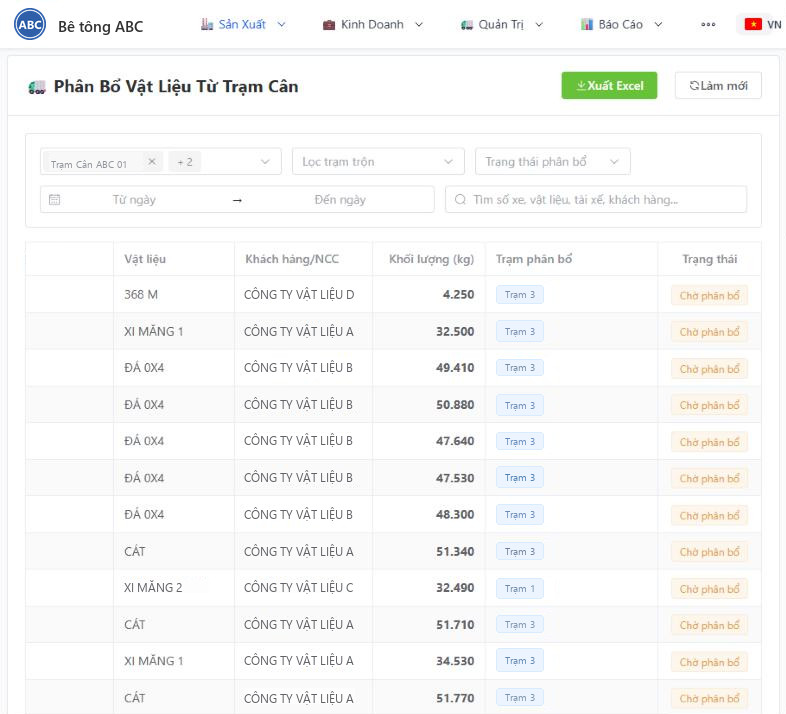
Incoming materials need no handwritten log either
Trucks carrying cement, sand, stone and admixtures cross the weighbridge and the weight appears on ConMixCloud by itself. You allocate it to the receiving plant; stock is calculated from what came in and what each batch actually consumed.
- Every incoming material weighing ticket appears on the web, filtered by weighbridge, allocation status and date
- Allocation checks the total weight; if you split it wrongly, reset and split again, and the earlier split can still be looked up
- Materials that do not cross the weighbridge can still be received by hand
- Close stock by period, compare counted stock with calculated stock, and review past closings
- Reports export to Excel; every allocation and stock closing is written to the system log
- WeighbridgeWeigh the truck carrying materialsCement, sand, stone and admixtures are weighed in; the net weight is the difference between the two weighings, with truck and plate photos.
- ConMixCloudThe weight goes to the cloudThe incoming material ticket shows up on the web as “Waiting for allocation”, kept apart from concrete weighings.
- AllocationSplit among the receiving plantsSplit one ticket across one or more plants. The split must add up exactly to the weighed amount.
- StockAdded to stock automaticallyOnce allocated, the receipt is created. Stock = opening + received − issued, where issued is the actual consumption of each batch.
- Stock closingCount, compare the differenceEnter the counted stock; the system compares it with calculated stock and records the difference; the next period starts from the counted figure.
Scheduling
Multi-step production plans
- Step 1DraftPlan by date, order and product.
- Step 2ConfirmA user with the right permission confirms the plan.
- Step 3ReleaseThe plan is released to the plant.
- Step 4In productionTrack the output mixed against the plan.
- Step 5CompletedThe plan is locked and can no longer be edited.
For plants in Cloud Sync mode, production plans are created and managed centrally on the web. The permission to confirm is separate from the permission to plan.
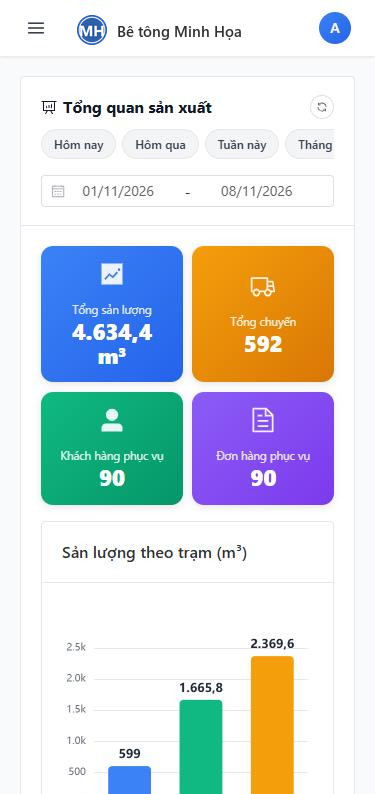
ConMixCloud on a phone
Take the whole plant with you in your pocket
Owners do not have to sit in the office to see output. The interface resizes to the screen and can be added to the phone's home screen like an app.
- Total output, trips, customers and orders served, right on the first screen
- Output chart by plant, for any date range
- Permissions: each person sees only the plants assigned to them
More
And more
Returned concrete
Record the reason and the treatment (discarded, cast into blocks, resold, remixed and redelivered, kept in stock); summarize what is discarded and reused, traced back to materials.
Detailed permissions
By role, by function, by plant and by station. Each person sees only the plants assigned to them.
One database per company
One company's data never mixes with another's. Vietnamese and English interface.
On computers and phones
The interface resizes to the screen and can be added to the phone's home screen like an app.
Excel report export
Daily output, material summary and detail, batch ticket summary and detail.
System log
Who did what, when and at which plant is always recorded.
What you need
What you need
ConMixCloud receives production data from plants running NovaMix and weighing tickets from weighbridges running TruckWeightScale; master data (customers, construction sites, trucks, drivers, materials, recipes, orders, plans) is managed on the cloud and synced down to the plants. Plants connect to the cloud in background cycles; if the network drops, data is kept and sent once it is back.
Want to see it?
We demo ConMixCloud with sample data in the 20-minute online demo, together with NovaMix and TruckWeightScale.
Book a demoWant to see every plant's output on one screen?
Tell us how many batching plants and weighbridges you have.
+84 903 071 100
134/49B Duong Thi Muoi, Tan Thoi Hiep Ward, Ho Chi Minh City, Vietnam
0319406766